Adobe Photoshop & Illustrator Keyboard Shortcut Cheat Sheets
18 Mar
Keyboard Shortcuts are keystrokes used to quickly invoke a command. As well, shortcuts usually (but not always) involve a modifier key such as Ctrl/Cmd, Alt/Opt, or Shift. For example, instead of choosing Select » Deselect from the menus, you could simply press Ctrl/Cmd+D.
Keyboard shortcuts can improve your efficiency, and in some cases, they can even invoke commands that might not otherwise be available (e.g., zooming while a dialog box is open, or inserting a Select forward layer command into an action).
One of Photoshop’s strengths is that it makes extensive use of keyboard shortcuts; but, there are so many that it’s difficult to remember them all. So, I’ve created a “cheat sheet” that’s organized by menu, as well as alphabetically by key. These “cheat sheets” are available in the following flavours (thanks to Trevor Morris.
Photoshop
- Adobe Photoshop CS4: PC | MAC
- Adobe Photoshop CS3: PC | MAC
- Adobe Photoshop CS2: PC | MAC
- Adobe Photoshop CS: PC | MAC
- Adobe Photoshop 7: PC
- Adobe Photoshop 6: PC
- Adobe Photoshop 5: PC
Illustrator
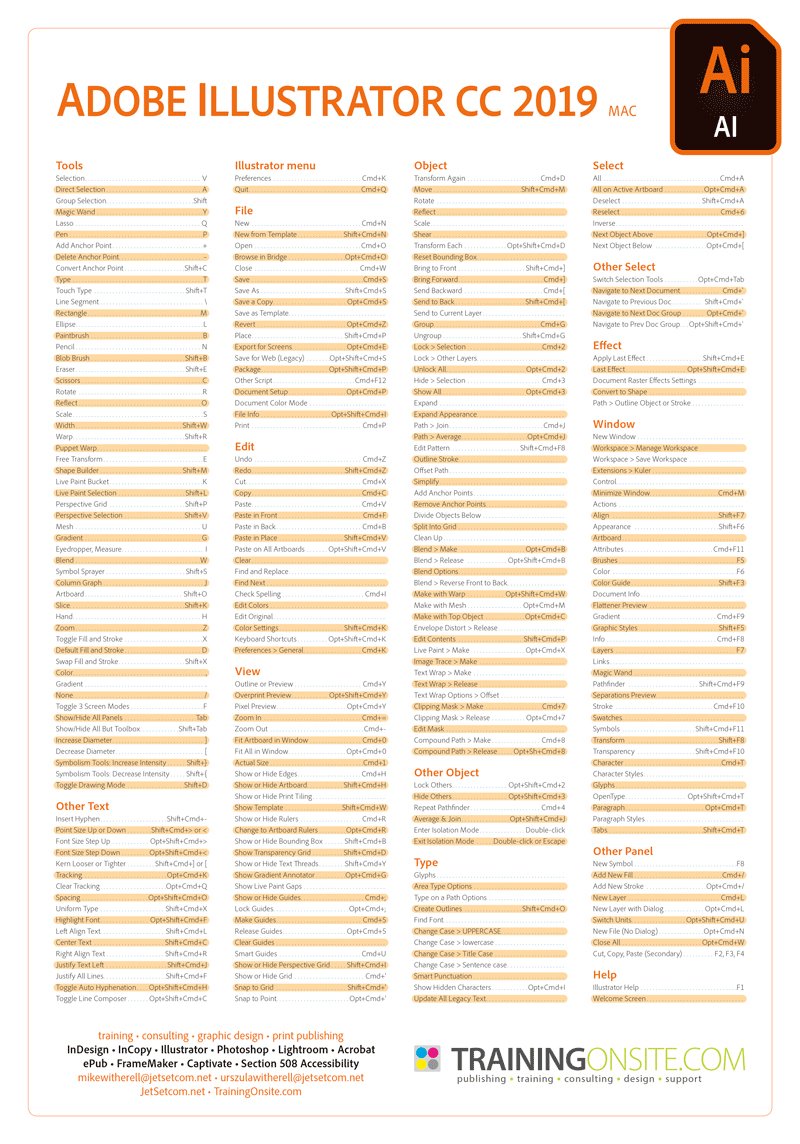
Plot points and manipulate bezier curves faster by using keyboard shortcuts for common actions while using Illustrator. Learn a few new shortcuts each day and you will greatly improve your efficiency while using Illustrator.
In computing, a keyboard shortcut or hotkey is a finite set of one or more keys that invoke a software or operating system operation when triggered by the user.
Keyboard shortcuts are typically an alternate means for invoking one or more commands that would otherwise be accessible only through a menu, a pointing device, different levels of a user interface, or via a command console. Keyboard shortcuts generally expedite common operations by reducing input sequences to a few keystrokes, hence the term “shortcut”.
Some keyboard shortcuts require the user to press a single key or a sequence of keys one after the other. Other keyboard shortcuts require pressing and holding several keys simultaneously. For simultaneous keyboard shortcuts, one usually first holds down the modifier key(s), then quickly presses and releases the regular (non-modifier) key, and finally releases the modifier key(s). This distinction is important, as trying to press all the keys simultaneously will frequently either miss some of the modifier keys, or cause unwanted auto-repeat. One exception is shortcuts involving the Esc key, which almost always requires pressing and releasing the Esc key before pressing the next key.
Enjoy the post and let me know of any other shortcuts I missed out on or should know about.
Please share this post: Twitter | Design Vote | Bump | Delicious | Digg | RSS


Sometimes when I use adobe it is hard to find some of the components there. Because of this shortcuts I can easy do thing with Adobe. Thanks
Yes, these shortcuts are major time savers while designing. In an 8 hour day you can save as much as 30 minutes using quick keys. Plus it gives your mouse finger a little rest
Glad these helped you out.
there is no other photo editing tool that is as good as Adobe Photoshop, It is simpy the best .